Appearance
The anybill SDK
About
The anybill Frontend SDKs bring digital receipts directly into your own customer-facing apps and websites. Retailers and partners use them to show customers their receipts inside an existing app, for example a store or loyalty app, without building the receipt handling themselves. The SDKs take care of the user authentication against anybill and provide ready-to-use functions to list, search, filter, export and delete receipts, including PDF export. Receipts appear in the app right after the purchase, for example once the customer has scanned their digital customer card at the checkout. Deep links from the anybill receipt website into your app additionally help you reach customers who do not use your app yet and turn them into new users.
Supported Platforms
The anybill SDK enables the integration of the digital receipts into frontend applications. Currently anybill supports Android, iOS, Flutter, React Native (Preview), Web and .NET MAUI integrations. Mobile SDKs are available in native Kotlin and Swift, as hybrid Flutter and React Native wrappers around the native SDKs, and as a C# implementation for .NET MAUI.
Integrating with an AI coding agent? anybill provides machine-readable documentation and a ready-to-use
AGENTS.mdfile. See AI-Assisted Integration.






Authentication
The anybill SDK supports the usage of your own user system by linking your users with an anybill account. Internally anybill always stores both an anybillUserId and an externalId for every user - the two flows below only differ in how that user record is created.
Implicit user creation via externalId (recommended)
If you do not want to persist an additional anybill user id in your system, simply pass an identifier from your own system (for example a customer number, card number or user id) as externalId when your backend requests the SDK token from the Partner Platform API. The anybill user is created on the first receipt that is sent with that externalId through the Vendor API. The token endpoint itself does not create a user; it returns HTTP 404 until a matching user exists.
Activation required
This flow has to be enabled per tenant on the anybill side. If POST /v3/user/token with externalId keeps returning 404 even after receipts with that id have been sent, please contact dev@anybill.de so we can enable the feature for your account.
Explicit user creation (linked user account)
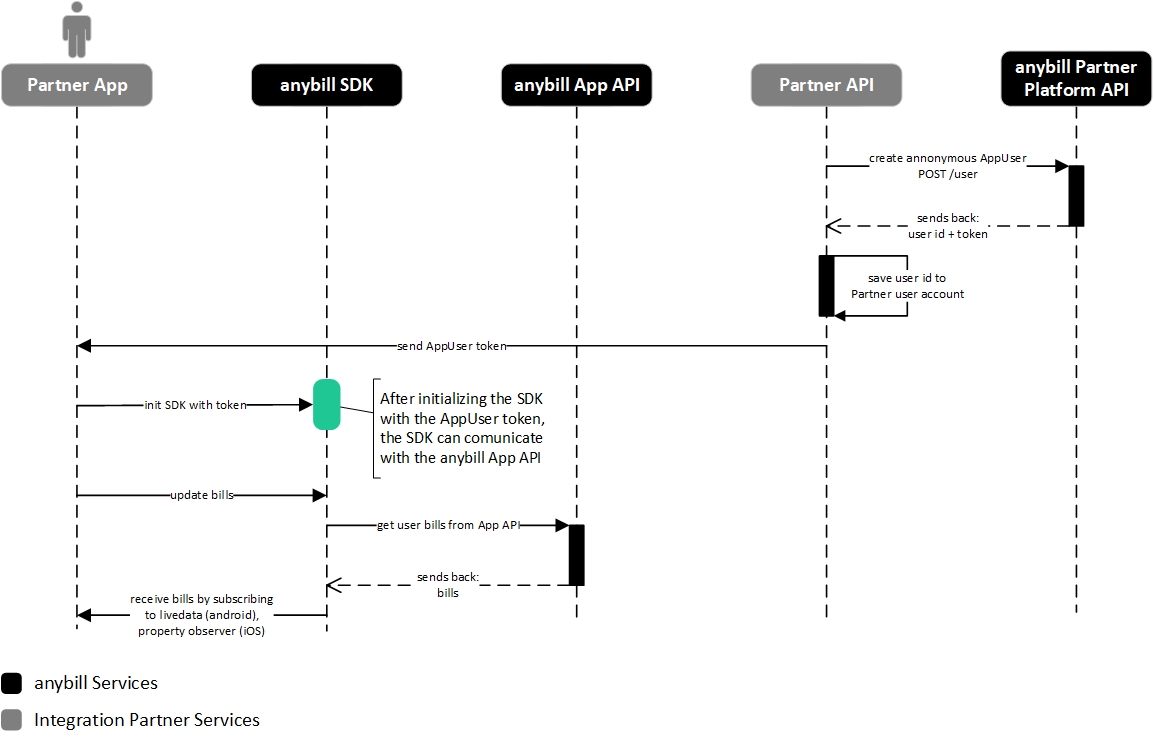
If you prefer to manage the anybill user life cycle explicitly you can create an anybill user via the Partner Platform API (POST /v3/user), store the returned anybillUserId alongside your own user record, and request access tokens based on that id. This is the "classic" flow; the SDK behaviour is identical to the externalId variant.
Flow: init the SDK with a linked user token
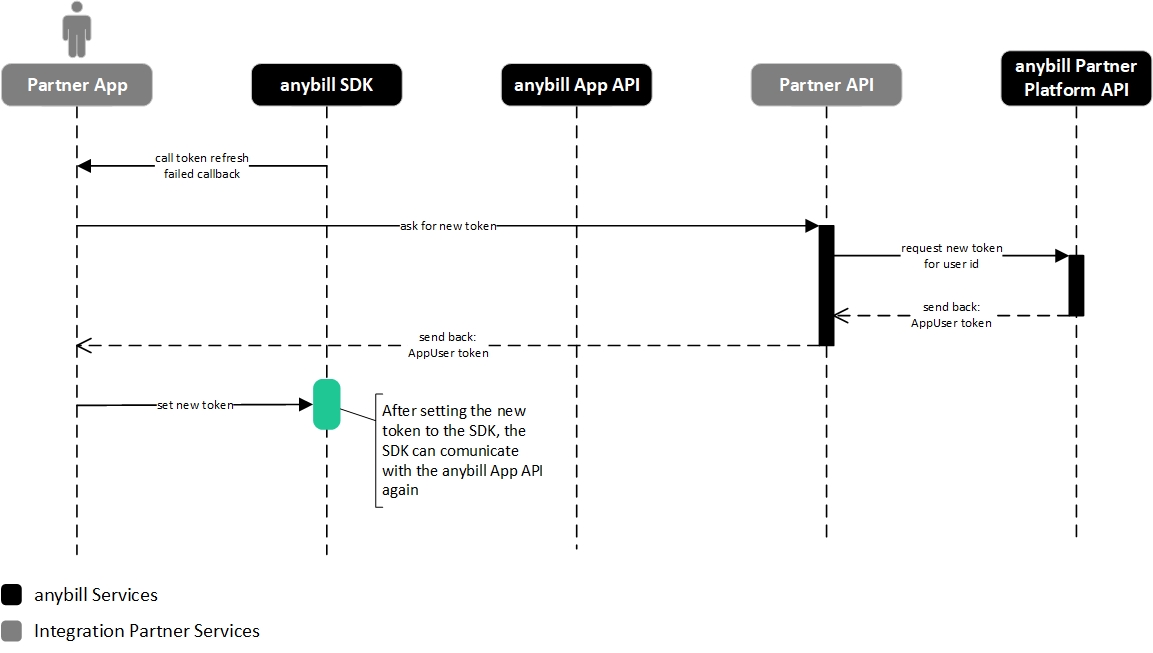
Flow: set a new token to the SDK after refreshing the previous token failed in the SDK