# Web Integration
> **Tip**
> The anybill web SDK is based on [async/await syntax](https://developer.mozilla.org/en-US/docs/Web/JavaScript/Reference/Statements/async_function). Although it is technically possible to use Promise based syntax we recommend the async/await syntax in conjunction with try/catch.
> **Warning: Breaking Changes in base module 1.0.0 - Migration Guide**
>
>
> With the release of our base module, which contains the logic that was split between our older modules, several changes have been introduced that require adjustments on your side. This migration guide is designed to help you transition smoothly and understand the key changes. Click here for more information...
>
>
> ---
>
> #### 1. **Initializing**
> The initialization of the anybill SDK has moved from the `loginTokenUser` method to `ApiConfig.initialize(clientId, environment)`. For a more detailed description refer to this [section](#initialization).
>
> ---
>
> #### 2. **Renaming**
> We have standardized our terminology by migrating to the correct naming of our product. All "Bill" references have been renamed to "Receipt":
>
> - **`BillDto` → `ReceiptDto`**:
> All subtypes of "Bill" have been removed and replaced with a unified `ReceiptDto`. This means you no longer need to handle multiple types.
>
> - **`BillProvider` → `ReceiptProvider`**:
> The `ReceiptProvider` now consolidates all methods previously found in `BillProvider`.
>
> ---
>
> #### 3. **Receipt Model Changes**
>
> - The receipt model has been streamlined to include only frontend-relevant parameters.
> - The `isFavourite` flag has been relocated to `Receipt.Misc.isFavourite` for better categorization.
>
> ---
>
> #### 4. **Receipt Method Renaming**
> The renaming of classes and models has also impacted the method names in the `ReceiptProvider`. Below are the most relevant changes:
>
> - **LiveData Updates**:
> - `bills` LiveData → `receipts` LiveData
>
> - **Method Renames**:
> - `getBillPDFasFile` → `getReceiptPDFasFile`
> - `getBillPDFasBlob` → `getReceiptPDFasBlob`
> - `updateBillComment` → `updateReceiptNote`
> - `updateIsFavourite` → `toggleIsFavourite`
>
> - **Receipt Retrieval Updates**:
> - Methods such as `getBills`, `updateBills`, and similar have been replaced with a new, optimized receipt retrieval process (details below).
>
> ---
>
> #### 5. **Receipt Retrieval Overhaul**
>
> We’ve introduced a significantly improved pagination and caching system designed to handle a larger volume of receipts efficiently.
> - Refer to this [Guide](#retrieving-receipts) for implementing the new optimized receipt retrieval process.
>
> ---
>
> #### Support
>
> If you encounter any issues during the migration process, don’t hesitate to reach out to us. We're here to help!
>
>
## Getting Started
### Resolving the SDK
The anybill SDK for web is hosted in a private npm registry (anybill-npm) that has also access to the public npm registry. This means there is no need to install peer dependencies as they get resolved in the registry itself.
That said here is how to resolve the SDK with scoped access from the anybill-npm registry:
1. Retrieve an from jfrog. Login to [jfrog](https://anybill.jfrog.io/ui/login).
Navigate to Artifacts -> Select the desired artifact and click on "Set me up". Enter your password and copy the
2. Add a `.npmrc` file to the root directory of your project containing the following:
```
//anybill.jfrog.io/artifactory/api/npm/anybill_web_sdk/:_authToken =
email = youremail@email.com
always-auth = true
@anybill:registry = https://anybill.jfrog.io/artifactory/api/npm/anybill_web_sdk/
```
> **Warning: SECRET**
> This file should **not** be checked into version control!
3. Now you can install modules via:
npm:
```bash
npm install @anybill/base
```
yarn:
```bash
yarn add @anybill/base
```
## Error handling
The anybill web SDK aims to provider the developer with easily understandable and catchable errors. The following two paragraphs introduce the used error model and how to work with it.
### Error object
The error object is based on the internal [`Error` object](https://developer.mozilla.org/en-US/docs/Web/JavaScript/Reference/Global_Objects/Error). It has the following structure:
```ts
class AnybillError extends Error {
status: number;
timestamp: string;
path?: string;
details?: any;
}
/// Example error handling
async function getQRData() {
try {
const res = await AuthProvider.instance.getQRCodeData();
/// Present qr code to user
} catch (ex) {
const error = ex as AnybillError;
switch (error.status) {
case 400:
/// handle bad request error
break;
case 401:
/// refetch credentials
break;
case 500:
/// handle server error
break;
}
}
}
```
All errors thrown by the Anybill SDK methods are of type `AnybillError`, making them easily parsable. The simplest way to handle specific errors is by checking the `status` property, which reflects the API response code or `0` if the error occurs before a request is sent. For additional context on the error, refer to the `details` parameter.
## Usage
### Initialization
To initialize the SDK with your clientId you must call the `initialize` method from the `ApiConfig` class. Furthermore this method allows you to change the api environment for testing purposes.
```ts
import { ApiConfig, ApiEnvironment } from "@anybill/base";
ApiConfig.initialize(
"your-client_id",
ApiEnvironment.TEST_API_URL
);
```
The optional second parameter accepts one of the following `ApiEnvironment` values. If it is omitted, the SDK uses `PROD_API_URL`.
| Value | Base URL |
|---|---|
| `ApiEnvironment.PROD_API_URL` (default) | `https://app.anybill.de/api/` |
| `ApiEnvironment.STG_API_URL` | `https://app.stg.anybill.de/api/` |
| `ApiEnvironment.TEST_API_URL` | `https://app.test.anybill.de/api/` |
| `ApiEnvironment.DEV_API_URL` | `https://localhost:60001/api/` (local development only) |
### Authentication
To authenticate the anybill SDK you can link an anybill user to your user account by using the linked token user. For detailed instructions, refer to the [Partner Platform API documentation](../partner_platform_api/api_v3.md#user-endpoints).
* Get a token from the anybill Partner API by linking you account system to an anybill id.
* Login with the anybill sdk
```ts
import { AuthProvider } from "@anybill/base";
try {
await AuthProvider.instance.loginTokenUser(accessToken, refreshToken);
} catch (ex) {
const error = ex as AnybillError;
switch (error.status) {
case 400:
/// accessToken or refreshToken argument was empty (integration error, no request was sent)
break;
case 401:
/// refetch credentials
break;
case 500:
/// handle server error
break;
}
}
```
> **Tip**
>
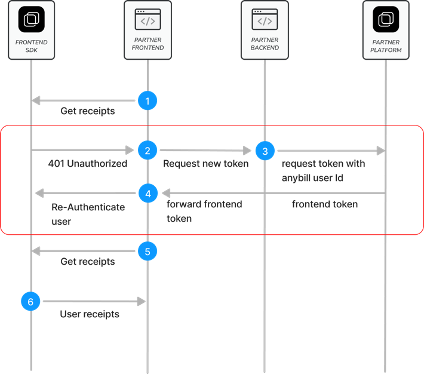
> When using the Token Based Login you'll have to check for a failing Refresh Token Call on the first anybill API Call you invoke by catching a 401 error. When the error is triggered you'll have to retrieve new authentication information from the anybill Partner Platform API.
>
>  >
*Token storage and manual refresh*
The SDK keeps the access and refresh token in the browser's `sessionStorage` and refreshes the access token automatically when it has expired. The current tokens can be read via the `accessToken` and `refreshToken` getters of the `AuthProvider`. If you need to trigger the refresh flow yourself, call `refresh()`. It uses the refresh token from `sessionStorage` by default; a different refresh token can be passed as an optional argument. The method throws an `AnybillError` with status `400` if the SDK was not initialized or no refresh token is available.
```ts
import { AuthProvider } from "@anybill/base";
// Tokens currently held in sessionStorage (null if not logged in)
const accessToken = AuthProvider.instance.accessToken;
const refreshToken = AuthProvider.instance.refreshToken;
// Manually acquire a new token pair
const tokens = await AuthProvider.instance.refresh();
```
### Getting user information
After logging in an anybill user with the received token, user information can be acquired using following methods:
```ts
import { AuthProvider } from "@anybill/base";
// User Model including id (anybill Id), externalId (usually your id) and more
const user = await AuthProvider.instance.getUserData();
// Data object which can be displayed as QR Code to receive receipts by scanning of the users device
const userQRCodeData = await AuthProvider.instance.getQRCodeData();
```
### Logout and account deletion
To end the session, call `logout()`. It removes the access and refresh token from `sessionStorage` and does not perform a request. To log in again, call `loginTokenUser` with a fresh token pair.
`deleteUser()` deletes the currently logged in anybill user on the server and logs the user out afterwards.
> **Warning**
> Do not call `deleteUser()` if you are creating the users in your backend (e.g. via the Partner Platform API). Delete the user through your backend instead.
```ts
import { AuthProvider } from "@anybill/base";
// Clear the tokens from sessionStorage
AuthProvider.instance.logout();
// Delete the currently logged in user (only for users created by the SDK itself)
await AuthProvider.instance.deleteUser();
```
### Retrieving receipts
The anybill SDK offers two distinct approaches for fetching user receipts:
1. **Direct API Access**: Use the `ReceiptProvider.getReceipts()` method to directly access the API. This approach allows you to implement custom fetching and pagination logic based on your specific requirements.
2. **Optimized SDK Caching Process**: Leverage the SDK's built-in caching and optimized pagination for efficient receipt retrieval by using the `initiateReceiptQuery()` and `continueReceiptQuery()` methods. This approach simplifies the retrieval process and reduces the need for manual pagination handling.
Detailed information about both approaches is provided below:
**Direct API Access**
The `getReceipts()` method allows you to retrieve user receipts with pagination support. The result includes the receipts, the total count of available receipts, and a continuation token that can be used to fetch subsequent batches.
You can customize the request with the following parameters:
* **take:** Specifies the number of receipts to fetch in each batch. The default value is 100. The maximum batch size is limited by the backend.
* **continuationToken:** A nullable token used for paginating through the query results. If `null`, a new query is initiated. To continue fetching from the previous result, use the `continuationToken` provided in the last response.
* **orderBy:** Specifies the field used for ordering the receipts. Currently, only `Date` is available.
* **orderDirection:** Defines the sort direction for the receipts, either `Ascending` or `Descending`.
> **Tip**
> **Important:**
>
> Due to database restrictions, you must specify the `orderBy` and `orderDirection` parameters for every page of the query.
>
> Also, remember to reset the `continuationToken` if you modify any query parameters.
```ts
try {
const continuationList = await ReceiptProvider.instance.getReceipts({
take: 100,
orderBy: UserReceiptOrderByFieldDto.Date,
orderDirection: OrderByDirectionDto.Descending,
});
/// handle receipts: continuationList.receipts
/// save continuation token to fetch the next batch of receitps: continuationList.continuationToken;
} catch (ex) {
/// handle error
}
```
**Optimized SDK Caching Process**
The anybill SDK offers an optimized receipt pagination process, providing efficient querying and display of receipts.
Similar to direct API access, you can customize the query with the following parameters:
* **take:** Specifies the number of receipts to retrieve in each batch. The default value is 100.
* **orderBy:** Specifies the field for ordering receipts. Currently, only `Date` is supported.
* **orderDirection:** Defines the sort direction for receipts, either `Ascending` or `Descending`.
> **Tip**
> **Note on Pagination and Sorting**
>
> The continuation token and query management are handled internally by the SDK, so there is no need for manual handling to load additional pages.
>
> If you wish to change the sorting or direction of the receipt list, use the `initiateReceiptQuery()` method again.
*Fetch first page / Update receipt list*
The `initiateReceiptQuery` method resets any existing query. We recommend calling this method in the following scenarios to ensure an up-to-date receipt list:
- **Initial Display of Receipt List**
When the receipt list is displayed for the first time in a session (e.g., when the user navigates to the receipt list view), this method should be called to display the latest receipt data.
- **New Receipt Received**
If a new receipt is issued while the user is in the app, the list should be refreshed upon notification of the new receipt (e.g., triggered by a webhook event). This ensures the receipt list reflects the latest transactions.
- **Manual User Update**
For scenarios where a user manually refreshes the list, such as through a "pull-to-refresh" gesture or a refresh button, use this method to re-fetch the latest data for the first page.
- **Change in Sort Order**
When changing the sorting parameters of the receipt list (e.g., switching the sort order), call this method with the new parameters. This will reset the cache to reflect the updated sorting criteria.
```ts
try {
const continuationList = await ReceiptProvider.instance.initiateReceiptQuery({
take: 100,
orderBy: UserReceiptOrderByFieldDto.Date,
orderDirection: OrderByDirectionDto.Descending,
});
/// handle receipts: continuationList.receipts
} catch (ex) {
/// handle error
}
```
*Fetch next page*
To retrieve the next batch of receipts in the existing query, use `continueReceiptQuery()`. This method automatically applies the previously retrieved continuation token to fetch the subsequent set of receipts. The optional `take` parameter (default 100) controls the batch size of the next page.
Use the `continuationToken` of the returned `ContinuationReceiptList` to detect the end of the list: once all receipts have been fetched, the token is set to the string `"finished"` and further calls return an empty `receipts` array without performing a request.
If `continueReceiptQuery()` is called without a preceding `initiateReceiptQuery()` in the current session, the SDK throws an `AnybillError` with status `0` and the message `"No continuation token found. Either no results available or initiate query first"`.
```ts
try {
const continuationList = await ReceiptProvider.instance.continueReceiptQuery({ take: 100 });
/// handle receipts: continuationList.receipts
if (continuationList.continuationToken === "finished") {
/// no more receipts available, disable further loading
}
} catch (ex) {
const error = ex as AnybillError;
if (error.status === 0) {
/// no query initiated yet, call initiateReceiptQuery() first
}
}
```
Querying for single receipts by id can be achieved with the `getReceiptByID` method of the `ReceiptProvider`
```ts
import { ReceiptProvider } from "@anybill/base";
const singleReceipt = await ReceiptProvider.instance
.getReceiptByID("receipt-id");
```
### Downloading user receipts
The `ReceiptProvider` has different methods of providing a PDF version of a receipt.
Following three functions are available and should be used according to your project setup:
```ts
import { ReceiptProvider } from "@anybill/base";
// best for client side use
const objectURL = await ReceiptProvider.instance
.getReceiptPDFasObjectURL(receiptId);
// flexible usage
const blob = await ReceiptProvider.instance
.getReceiptPDFasBlob(receiptId);
// best for server side use
const file = await ReceiptProvider.instance
.getReceiptPDFasFile(receiptId, false, false, {});
// optional: printed version including return receipts, with a custom file name
const printedFile = await ReceiptProvider.instance
.getReceiptPDFasFile(receiptId, true, true, { fileName: "my-receipt.pdf" });
```
All three methods accept the same optional flags after the `receiptId`:
* **isPrintedVersion:** Indicates whether the PDF should be formatted for printing. Defaults to `false`.
* **includeReturnReceipts:** Indicates whether return receipts belonging to the receipt should be included in the PDF. Defaults to `false`.
> **Warning: Options object of getReceiptPDFasFile**
> `getReceiptPDFasFile` takes a fourth parameter, an options object with an optional `fileName`. In the current SDK version this parameter has no default value and must always be passed, even if empty (`{}`). Calling `getReceiptPDFasFile(receiptId)` with a single argument does not compile.
> **Warning: ObjectURL memory**
> ObjectURLs generated with `getReceiptPDFasObjectURL` are **not automagically** revoked!
> To do so use [`URL.revokeObjectURL`](https://developer.mozilla.org/en-US/docs/Web/API/URL/revokeObjectURL) after using the URL.
> **Tip: File name**
> If no `fileName` is passed in the options object, the `File` returned by `getReceiptPDFasFile` has a name with template:
> ```ts
> `receipt-export_${new Date().toLocaleDateString()}.pdf`
> ```
### Export receipts
Using `ReceiptProvider.exportReceipts()` multiple receipts can be exported at once. The backend bundles the receipts into a ZIP file and sends the user an email containing a link to the exported file; the method itself resolves without a return value. If an empty array (or no argument) is passed, every receipt of the user is exported. Anonymous app users can not use this function.
```ts
import { ReceiptProvider } from "@anybill/base";
// Export selected receipts
await ReceiptProvider.instance.exportReceipts([receiptId1, receiptId2]);
// Export all receipts of the user
await ReceiptProvider.instance.exportReceipts([]);
```
### Deleting users receipts
Using the `ReceiptProvider` utility you can delete either a single receipt or multiple receipts at once by calling following methods with the corresponding receiptIds.
```ts
import { ReceiptProvider } from "@anybill/base";
// Delete a single receipt
await ReceiptProvider.instance.deleteReceipt(receiptId);
// Delete multiple receipts at once
await ReceiptProvider.instance.deleteReceipts([receiptId1, receiptId2]);
```
### Mark a receipt as favourite
User receipts can be marked as favourite using following function:
```ts
import { ReceiptProvider } from "@anybill/base";
// Toggle isFavourite flag
await ReceiptProvider.instance.toggleIsFavourite(receiptId);
```
> **Tip: Receipt Model**
>
> Boolean value `ReceiptDto.misc.isFavourite` determines whether a receipt is marked as favourite.
>
### Update receipt note
Using the `ReceiptProvider.updateReceiptNote()` method, a custom note can be set for a receipt which can be retrieved in the `ReceiptDto.misc.note` field. The method returns the updated `ReceiptDto`.
This field can later on be used for querying and filtering the receipt list.
```ts
import { ReceiptProvider } from "@anybill/base";
// Update note flag
await ReceiptProvider.instance.updateReceiptNote(
receiptId,
note
);
```
### Add receipt
To add a new receipt to the authenticated user account, implement the `ReceiptProvider.addReceiptByID(receiptID: string, isSelfGenerated: boolean = false, vendorCustomerID: string | null = null)` method.
Make sure to update the receipt list, once a new user receipt is added.
```ts
import { ReceiptProvider } from "@anybill/base";
// Update note flag
await ReceiptProvider.instance.addReceiptByID(
receiptId,
isSelfGenerated,
vendorCustomerID
);
```
### Filtering receipt list
The anybill SDK delivers receipts as structured data, enabling you to filter by any receipt field seamlessly. This allows you to display all relevant results dynamically, without the need to explicitly initiate API calls with query parameters.
Common use cases include filtering the receipt list for favorites or searching for specific string values.
For an easy query of the receipt list the anybill SDK provides an function called `searchReceipts(receipts: ReceiptDto[], search: string)`. The method filters store name, address, amount, note, and line and discount descriptions. As this method is highly performance costing, we do recommend checking for a min length of the keyword (e.g. > 3) before executing.
*Example implementation of allowing to simultaneously query for a string value*
```ts
// Unfiltered receipts
let receipts: ReceiptDto[] = [];
// Filtered receipts
let filteredReceipts: ReceiptDto[] = [];
// Function that is called if the search term changes
function onSearchTermChanged(searchTerm: string) {
if (searchTerm.length <= 3) {
filteredReceipts = receipts;
return;
}
filteredReceipts = searchReceipts(receipts, searchTerm);
}
```
### Fuzzy Receipt Search
> **Tip: 💲 Premium Feature**
> The Fuzzy Receipt Search is a premium feature that needs to be explicitly activated for merchants. Please contact `support@anybill.de` to talk about details.
While the `searchReceipts(receipts, search)` function (see [Filtering receipt list](#filtering-receipt-list)) performs a local, in-memory match across the receipts currently held in the cache, the anybill SDK additionally provides a server-side **Fuzzy Receipt Search**. Instead of relying on exact string matches, the backend evaluates the similarity between the search query and the indexed receipt content. This includes the line item descriptions as well as additional keywords that anybill enriches each receipt with (e.g. brand names, product categories, or common synonyms). As a result, users can find relevant receipts even when their query does not exactly match the text printed on the receipt, for example due to typos, abbreviations, or alternative product wording.
Because the search runs against the full receipt index on the backend, it is not limited to the receipts already loaded into the local cache. This makes it well suited as the primary search experience for users with a large receipt history.
> **Tip**
> The Fuzzy Receipt Search is the recommended approach for advanced, full-history search and complements the local `searchReceipts(receipts, search)` function, which remains available for lightweight filtering of the already cached receipt list. Note that the server-side search is a method on the `ReceiptProvider` (`ReceiptProvider.instance.searchReceipts(query)`), whereas the local filter is a standalone helper function (`searchReceipts(receipts, search)`).
#### Performing a search
To run a fuzzy search, use the `ReceiptProvider.searchReceipts()` method:
```ts
async searchReceipts(
query: string,
page?: number,
limit?: number,
minSimilarity?: number
): Promise
```
***Parameters:***
**`query`**:
The search term entered by the user.
**`page`**:
Optional page index used for pagination. If `undefined`, the first page is returned.
**`limit`**:
Optional number of receipts to return per page. If `undefined`, the default page size is applied.
**`minSimilarity`**:
Optional threshold (range `0.0` to `1.0`) controlling how closely a receipt must match the query to be included in the result. Lower values return more but less precise results, while higher values restrict the result set to closer matches. If `undefined`, the backend default is applied.
Accessing the returned receipts works equivalently to the standard receipt retrieval described in [Retrieving receipts](#retrieving-receipts): the call resolves directly to a `ReceiptDto[]` array. On success, the matched receipts are returned directly; errors are thrown as an `AnybillError` and should be handled via `try/catch`.
#### The searchMatches field
The key difference between a searched receipt and a regularly retrieved one is the additional `searchMatches` field in the `data` object of the returned `ReceiptDto` objects (`receipt.data.searchMatches`, type `string[] | undefined`). `searchMatches` contains the list of product names that triggered a match.
This information can be used in your frontend to highlight the matching products on the displayed receipt, helping users immediately understand why a given receipt was returned. This is particularly useful in web integrations or in any context where the receipt is rendered as structured data rather than displayed as a PDF.
```ts
import { ReceiptProvider } from "@anybill/base";
async function searchReceipts(query: string) {
try {
const receipts = await ReceiptProvider.instance.searchReceipts(query);
receipts.forEach((receipt) => {
// receipt.data.searchMatches contains the matched product names.
// Use these to highlight the relevant line items in your UI.
});
} catch (ex) {
const error = ex as AnybillError;
switch (error.status) {
case 400:
/// handle bad request error
break;
case 401:
/// refetch credentials
break;
case 500:
/// handle server error
break;
}
}
}
```
>
*Token storage and manual refresh*
The SDK keeps the access and refresh token in the browser's `sessionStorage` and refreshes the access token automatically when it has expired. The current tokens can be read via the `accessToken` and `refreshToken` getters of the `AuthProvider`. If you need to trigger the refresh flow yourself, call `refresh()`. It uses the refresh token from `sessionStorage` by default; a different refresh token can be passed as an optional argument. The method throws an `AnybillError` with status `400` if the SDK was not initialized or no refresh token is available.
```ts
import { AuthProvider } from "@anybill/base";
// Tokens currently held in sessionStorage (null if not logged in)
const accessToken = AuthProvider.instance.accessToken;
const refreshToken = AuthProvider.instance.refreshToken;
// Manually acquire a new token pair
const tokens = await AuthProvider.instance.refresh();
```
### Getting user information
After logging in an anybill user with the received token, user information can be acquired using following methods:
```ts
import { AuthProvider } from "@anybill/base";
// User Model including id (anybill Id), externalId (usually your id) and more
const user = await AuthProvider.instance.getUserData();
// Data object which can be displayed as QR Code to receive receipts by scanning of the users device
const userQRCodeData = await AuthProvider.instance.getQRCodeData();
```
### Logout and account deletion
To end the session, call `logout()`. It removes the access and refresh token from `sessionStorage` and does not perform a request. To log in again, call `loginTokenUser` with a fresh token pair.
`deleteUser()` deletes the currently logged in anybill user on the server and logs the user out afterwards.
> **Warning**
> Do not call `deleteUser()` if you are creating the users in your backend (e.g. via the Partner Platform API). Delete the user through your backend instead.
```ts
import { AuthProvider } from "@anybill/base";
// Clear the tokens from sessionStorage
AuthProvider.instance.logout();
// Delete the currently logged in user (only for users created by the SDK itself)
await AuthProvider.instance.deleteUser();
```
### Retrieving receipts
The anybill SDK offers two distinct approaches for fetching user receipts:
1. **Direct API Access**: Use the `ReceiptProvider.getReceipts()` method to directly access the API. This approach allows you to implement custom fetching and pagination logic based on your specific requirements.
2. **Optimized SDK Caching Process**: Leverage the SDK's built-in caching and optimized pagination for efficient receipt retrieval by using the `initiateReceiptQuery()` and `continueReceiptQuery()` methods. This approach simplifies the retrieval process and reduces the need for manual pagination handling.
Detailed information about both approaches is provided below:
**Direct API Access**
The `getReceipts()` method allows you to retrieve user receipts with pagination support. The result includes the receipts, the total count of available receipts, and a continuation token that can be used to fetch subsequent batches.
You can customize the request with the following parameters:
* **take:** Specifies the number of receipts to fetch in each batch. The default value is 100. The maximum batch size is limited by the backend.
* **continuationToken:** A nullable token used for paginating through the query results. If `null`, a new query is initiated. To continue fetching from the previous result, use the `continuationToken` provided in the last response.
* **orderBy:** Specifies the field used for ordering the receipts. Currently, only `Date` is available.
* **orderDirection:** Defines the sort direction for the receipts, either `Ascending` or `Descending`.
> **Tip**
> **Important:**
>
> Due to database restrictions, you must specify the `orderBy` and `orderDirection` parameters for every page of the query.
>
> Also, remember to reset the `continuationToken` if you modify any query parameters.
```ts
try {
const continuationList = await ReceiptProvider.instance.getReceipts({
take: 100,
orderBy: UserReceiptOrderByFieldDto.Date,
orderDirection: OrderByDirectionDto.Descending,
});
/// handle receipts: continuationList.receipts
/// save continuation token to fetch the next batch of receitps: continuationList.continuationToken;
} catch (ex) {
/// handle error
}
```
**Optimized SDK Caching Process**
The anybill SDK offers an optimized receipt pagination process, providing efficient querying and display of receipts.
Similar to direct API access, you can customize the query with the following parameters:
* **take:** Specifies the number of receipts to retrieve in each batch. The default value is 100.
* **orderBy:** Specifies the field for ordering receipts. Currently, only `Date` is supported.
* **orderDirection:** Defines the sort direction for receipts, either `Ascending` or `Descending`.
> **Tip**
> **Note on Pagination and Sorting**
>
> The continuation token and query management are handled internally by the SDK, so there is no need for manual handling to load additional pages.
>
> If you wish to change the sorting or direction of the receipt list, use the `initiateReceiptQuery()` method again.
*Fetch first page / Update receipt list*
The `initiateReceiptQuery` method resets any existing query. We recommend calling this method in the following scenarios to ensure an up-to-date receipt list:
- **Initial Display of Receipt List**
When the receipt list is displayed for the first time in a session (e.g., when the user navigates to the receipt list view), this method should be called to display the latest receipt data.
- **New Receipt Received**
If a new receipt is issued while the user is in the app, the list should be refreshed upon notification of the new receipt (e.g., triggered by a webhook event). This ensures the receipt list reflects the latest transactions.
- **Manual User Update**
For scenarios where a user manually refreshes the list, such as through a "pull-to-refresh" gesture or a refresh button, use this method to re-fetch the latest data for the first page.
- **Change in Sort Order**
When changing the sorting parameters of the receipt list (e.g., switching the sort order), call this method with the new parameters. This will reset the cache to reflect the updated sorting criteria.
```ts
try {
const continuationList = await ReceiptProvider.instance.initiateReceiptQuery({
take: 100,
orderBy: UserReceiptOrderByFieldDto.Date,
orderDirection: OrderByDirectionDto.Descending,
});
/// handle receipts: continuationList.receipts
} catch (ex) {
/// handle error
}
```
*Fetch next page*
To retrieve the next batch of receipts in the existing query, use `continueReceiptQuery()`. This method automatically applies the previously retrieved continuation token to fetch the subsequent set of receipts. The optional `take` parameter (default 100) controls the batch size of the next page.
Use the `continuationToken` of the returned `ContinuationReceiptList` to detect the end of the list: once all receipts have been fetched, the token is set to the string `"finished"` and further calls return an empty `receipts` array without performing a request.
If `continueReceiptQuery()` is called without a preceding `initiateReceiptQuery()` in the current session, the SDK throws an `AnybillError` with status `0` and the message `"No continuation token found. Either no results available or initiate query first"`.
```ts
try {
const continuationList = await ReceiptProvider.instance.continueReceiptQuery({ take: 100 });
/// handle receipts: continuationList.receipts
if (continuationList.continuationToken === "finished") {
/// no more receipts available, disable further loading
}
} catch (ex) {
const error = ex as AnybillError;
if (error.status === 0) {
/// no query initiated yet, call initiateReceiptQuery() first
}
}
```
Querying for single receipts by id can be achieved with the `getReceiptByID` method of the `ReceiptProvider`
```ts
import { ReceiptProvider } from "@anybill/base";
const singleReceipt = await ReceiptProvider.instance
.getReceiptByID("receipt-id");
```
### Downloading user receipts
The `ReceiptProvider` has different methods of providing a PDF version of a receipt.
Following three functions are available and should be used according to your project setup:
```ts
import { ReceiptProvider } from "@anybill/base";
// best for client side use
const objectURL = await ReceiptProvider.instance
.getReceiptPDFasObjectURL(receiptId);
// flexible usage
const blob = await ReceiptProvider.instance
.getReceiptPDFasBlob(receiptId);
// best for server side use
const file = await ReceiptProvider.instance
.getReceiptPDFasFile(receiptId, false, false, {});
// optional: printed version including return receipts, with a custom file name
const printedFile = await ReceiptProvider.instance
.getReceiptPDFasFile(receiptId, true, true, { fileName: "my-receipt.pdf" });
```
All three methods accept the same optional flags after the `receiptId`:
* **isPrintedVersion:** Indicates whether the PDF should be formatted for printing. Defaults to `false`.
* **includeReturnReceipts:** Indicates whether return receipts belonging to the receipt should be included in the PDF. Defaults to `false`.
> **Warning: Options object of getReceiptPDFasFile**
> `getReceiptPDFasFile` takes a fourth parameter, an options object with an optional `fileName`. In the current SDK version this parameter has no default value and must always be passed, even if empty (`{}`). Calling `getReceiptPDFasFile(receiptId)` with a single argument does not compile.
> **Warning: ObjectURL memory**
> ObjectURLs generated with `getReceiptPDFasObjectURL` are **not automagically** revoked!
> To do so use [`URL.revokeObjectURL`](https://developer.mozilla.org/en-US/docs/Web/API/URL/revokeObjectURL) after using the URL.
> **Tip: File name**
> If no `fileName` is passed in the options object, the `File` returned by `getReceiptPDFasFile` has a name with template:
> ```ts
> `receipt-export_${new Date().toLocaleDateString()}.pdf`
> ```
### Export receipts
Using `ReceiptProvider.exportReceipts()` multiple receipts can be exported at once. The backend bundles the receipts into a ZIP file and sends the user an email containing a link to the exported file; the method itself resolves without a return value. If an empty array (or no argument) is passed, every receipt of the user is exported. Anonymous app users can not use this function.
```ts
import { ReceiptProvider } from "@anybill/base";
// Export selected receipts
await ReceiptProvider.instance.exportReceipts([receiptId1, receiptId2]);
// Export all receipts of the user
await ReceiptProvider.instance.exportReceipts([]);
```
### Deleting users receipts
Using the `ReceiptProvider` utility you can delete either a single receipt or multiple receipts at once by calling following methods with the corresponding receiptIds.
```ts
import { ReceiptProvider } from "@anybill/base";
// Delete a single receipt
await ReceiptProvider.instance.deleteReceipt(receiptId);
// Delete multiple receipts at once
await ReceiptProvider.instance.deleteReceipts([receiptId1, receiptId2]);
```
### Mark a receipt as favourite
User receipts can be marked as favourite using following function:
```ts
import { ReceiptProvider } from "@anybill/base";
// Toggle isFavourite flag
await ReceiptProvider.instance.toggleIsFavourite(receiptId);
```
> **Tip: Receipt Model**
>
> Boolean value `ReceiptDto.misc.isFavourite` determines whether a receipt is marked as favourite.
>
### Update receipt note
Using the `ReceiptProvider.updateReceiptNote()` method, a custom note can be set for a receipt which can be retrieved in the `ReceiptDto.misc.note` field. The method returns the updated `ReceiptDto`.
This field can later on be used for querying and filtering the receipt list.
```ts
import { ReceiptProvider } from "@anybill/base";
// Update note flag
await ReceiptProvider.instance.updateReceiptNote(
receiptId,
note
);
```
### Add receipt
To add a new receipt to the authenticated user account, implement the `ReceiptProvider.addReceiptByID(receiptID: string, isSelfGenerated: boolean = false, vendorCustomerID: string | null = null)` method.
Make sure to update the receipt list, once a new user receipt is added.
```ts
import { ReceiptProvider } from "@anybill/base";
// Update note flag
await ReceiptProvider.instance.addReceiptByID(
receiptId,
isSelfGenerated,
vendorCustomerID
);
```
### Filtering receipt list
The anybill SDK delivers receipts as structured data, enabling you to filter by any receipt field seamlessly. This allows you to display all relevant results dynamically, without the need to explicitly initiate API calls with query parameters.
Common use cases include filtering the receipt list for favorites or searching for specific string values.
For an easy query of the receipt list the anybill SDK provides an function called `searchReceipts(receipts: ReceiptDto[], search: string)`. The method filters store name, address, amount, note, and line and discount descriptions. As this method is highly performance costing, we do recommend checking for a min length of the keyword (e.g. > 3) before executing.
*Example implementation of allowing to simultaneously query for a string value*
```ts
// Unfiltered receipts
let receipts: ReceiptDto[] = [];
// Filtered receipts
let filteredReceipts: ReceiptDto[] = [];
// Function that is called if the search term changes
function onSearchTermChanged(searchTerm: string) {
if (searchTerm.length <= 3) {
filteredReceipts = receipts;
return;
}
filteredReceipts = searchReceipts(receipts, searchTerm);
}
```
### Fuzzy Receipt Search
> **Tip: 💲 Premium Feature**
> The Fuzzy Receipt Search is a premium feature that needs to be explicitly activated for merchants. Please contact `support@anybill.de` to talk about details.
While the `searchReceipts(receipts, search)` function (see [Filtering receipt list](#filtering-receipt-list)) performs a local, in-memory match across the receipts currently held in the cache, the anybill SDK additionally provides a server-side **Fuzzy Receipt Search**. Instead of relying on exact string matches, the backend evaluates the similarity between the search query and the indexed receipt content. This includes the line item descriptions as well as additional keywords that anybill enriches each receipt with (e.g. brand names, product categories, or common synonyms). As a result, users can find relevant receipts even when their query does not exactly match the text printed on the receipt, for example due to typos, abbreviations, or alternative product wording.
Because the search runs against the full receipt index on the backend, it is not limited to the receipts already loaded into the local cache. This makes it well suited as the primary search experience for users with a large receipt history.
> **Tip**
> The Fuzzy Receipt Search is the recommended approach for advanced, full-history search and complements the local `searchReceipts(receipts, search)` function, which remains available for lightweight filtering of the already cached receipt list. Note that the server-side search is a method on the `ReceiptProvider` (`ReceiptProvider.instance.searchReceipts(query)`), whereas the local filter is a standalone helper function (`searchReceipts(receipts, search)`).
#### Performing a search
To run a fuzzy search, use the `ReceiptProvider.searchReceipts()` method:
```ts
async searchReceipts(
query: string,
page?: number,
limit?: number,
minSimilarity?: number
): Promise
```
***Parameters:***
**`query`**:
The search term entered by the user.
**`page`**:
Optional page index used for pagination. If `undefined`, the first page is returned.
**`limit`**:
Optional number of receipts to return per page. If `undefined`, the default page size is applied.
**`minSimilarity`**:
Optional threshold (range `0.0` to `1.0`) controlling how closely a receipt must match the query to be included in the result. Lower values return more but less precise results, while higher values restrict the result set to closer matches. If `undefined`, the backend default is applied.
Accessing the returned receipts works equivalently to the standard receipt retrieval described in [Retrieving receipts](#retrieving-receipts): the call resolves directly to a `ReceiptDto[]` array. On success, the matched receipts are returned directly; errors are thrown as an `AnybillError` and should be handled via `try/catch`.
#### The searchMatches field
The key difference between a searched receipt and a regularly retrieved one is the additional `searchMatches` field in the `data` object of the returned `ReceiptDto` objects (`receipt.data.searchMatches`, type `string[] | undefined`). `searchMatches` contains the list of product names that triggered a match.
This information can be used in your frontend to highlight the matching products on the displayed receipt, helping users immediately understand why a given receipt was returned. This is particularly useful in web integrations or in any context where the receipt is rendered as structured data rather than displayed as a PDF.
```ts
import { ReceiptProvider } from "@anybill/base";
async function searchReceipts(query: string) {
try {
const receipts = await ReceiptProvider.instance.searchReceipts(query);
receipts.forEach((receipt) => {
// receipt.data.searchMatches contains the matched product names.
// Use these to highlight the relevant line items in your UI.
});
} catch (ex) {
const error = ex as AnybillError;
switch (error.status) {
case 400:
/// handle bad request error
break;
case 401:
/// refetch credentials
break;
case 500:
/// handle server error
break;
}
}
}
```